Using Your Node
Besides contributing to decentralization, your Ethereum on ARM node can be used to send transactions and query the Ethereum API.
If this is your first time configuring network access, review Node Security before exposing your node publicly.
Pre-installed Nginx proxy
All recent Ethereum on ARM images include an Nginx reverse proxy preconfigured to route HTTPS (port 443) to the local Execution Layer JSON-RPC port 8545.
This proxy makes wallet and dApp integration straightforward while keeping
the internal RPC service bound to 127.0.0.1.
To verify that Nginx and the proxy extras are installed:
sudo apt-get update
sudo apt-get install nginx
sudo apt-get install ethereumonarm-nginx-proxy-extras
sudo systemctl status nginx
The configuration file is located at:
/etc/nginx/sites-available/ethereum-ssl.conf
If you have a valid certificate (Let’s Encrypt or your own CA), edit this file and set the correct certificate paths:
ssl_certificate     /etc/letsencrypt/live/<your-domain>/fullchain.pem;
ssl_certificate_key /etc/letsencrypt/live/<your-domain>/privkey.pem;
Reload Nginx to apply changes:
sudo systemctl reload nginx
Firewall integration
UFW profiles make enabling HTTPS and node networking simple. These profiles are pre-installed
on all Ethereum on ARM images (via the ethereumonarm-monitoring-extras package).
Typical configuration:
sudo ufw allow "OpenSSH"
sudo ufw allow "Nginx HTTPS"
sudo ufw allow "Ethereum EL P2P"
sudo ufw allow "Ethereum CL P2P"
sudo ufw enable
Verify that the rules are active:
sudo ufw status verbose
sudo ss -tuln | grep -E "30303|9000|443|8545"
Connecting MetaMask
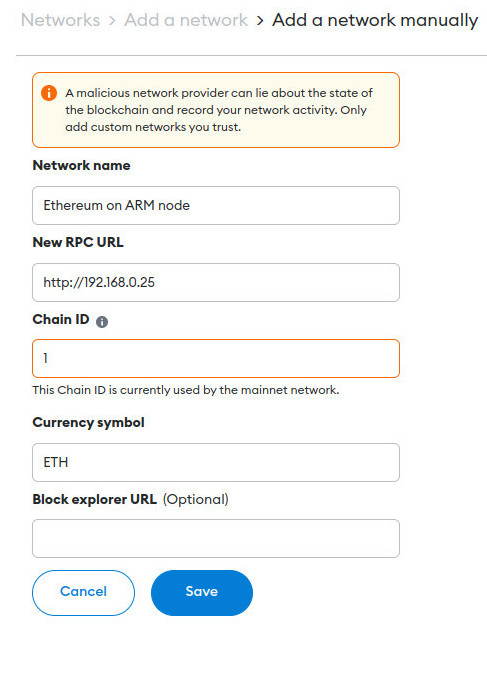
Open the MetaMask extension and click the network selector (it likely shows “Ethereum Mainnet”).
Click “Add Network”, then select “Add a network manually.”
Enter your node details:
Network Name: My Ethereum Node
New RPC URL:
https://<your-node-domain>Chain ID: 1 (for Mainnet)
Currency Symbol: ETH
Save and connect. MetaMask will now route all transactions securely through your node’s HTTPS endpoint.
Querying the blockchain
You can query your node directly using curl or any JSON-RPC library.
Example — get the latest block number (replace $YOUR_NODE_IP or domain):
curl --data '{"method":"eth_blockNumber","params":[],"id":1,"jsonrpc":"2.0"}' \
     -H "Content-Type: application/json" \
     -X POST https://$YOUR_NODE_IP
Expected output:
{"jsonrpc":"2.0","id":1,"result":"0x123456"}
Ensure Nginx is running and listening on 443.
Check that UFW includes “Nginx HTTPS”.
Confirm certificate paths in
/etc/nginx/sites-available/ethereum-ssl.conf.
Next steps
For information about security, SSH access, and all available firewall profiles, refer back to: Node Security